World
Topics from outside of this forum. Views and opinions represented here may not reflect those of this forum and its members.
-
Questo canale è dedicato a notizie e aggiornamenti sul fediverso e alla comunicazione di iniziative ed eventi che adottano il fediverso come strumento di diffusione sociale.
NB: gli utenti si assumono la responsabilità di ciò che scrivono; sono comunque vietati gli off topic, il linguaggio aggressivo e i contenuti illegali e pornografici.
-
La comunità del Convegno Nazionale sull'Open Source in Italia.
DevConf nasce per dare a tutti gli sviluppatori di applicazioni la possibilità di promuovere le proprie creazioni e i propri progetti e di fare rete, con la possibilità di farle conoscere attraverso la distribuzione italiana Ufficio Zero Linux OS.
Sito web: https://devconf.it
-
Welcome to Funhole! The first and only hole on SDF exclusively for fun content! Are you a content creator? Then come post your content and join the fun!
-
Ecco finalmente la comunità italiana Lemmy dedicata all’informatica!
Questo è il luogo in cui condividere post sul mondo dell’informatica: notizie su hardware e software, cybersecurity, cyberwarfare, hacking, nuovi prodotti, data breach!
Ricordiamo che esistono anche alcune comunità che si occupano di argomenti più specifici, quali:
- Le Alternative, dedicata alle alternative open source ai prodotti più diffusi
- Etica Digitale, dedicata alle implicazioni etiche della tecnologia
- Pirati Europei, dedicata al mondo dei pirati italiani ed europei
- Che succede nel Fediverso, dedicata alle notizie sul fediverso
- Devol, con le notizie sulle istanze del fediverso e i servizi di decentralizzazione del collettivo Devol
- Lavoratori Tech, dedicata al tema del lavoro tecnologico
- Videogiochi, dedicata al gaming
- Retrogaming, per i videogiochi vintage
- GNU/Linux Italia, dedicata nello specifico al mondo del pinguino
Regole della comunità:
🏳️🌈 chiediamo educazione e rispetto per gli altri
🎃 anche se ci chiamiamo “Informatica” non banniamo gli utenti a caso 😁
🚫 trolling, shitposting e molestie sono vietati
💲 è vietato superare il confine che separa l’informazione dalla pubblicità
🔊 evitiamo il clickbait e il sensazionalismo
📖 per il resto valgono le regole dell’istanza al link https://feddit.it/post/6
-
The largest art collective of Scientific Operations.
-
Tech, Gaming, and sometimes, for no easily explainable reason, puppets! Presented by Operation: Puppet
-
BSD Cafe - Announcements
Within this community, we will share significant updates concerning this instance and the various tools available at BSD Cafe.
For additional information, please refer to our wiki: wiki.bsd.cafe
-
tag me to post to subversive.pics!
-
Tutorials, reviews, and commentary on **Linux, BSD, and free software** — from a passionate FOSS advocate. Live stream classrooms every week, currently covering **LPIC-1 (102)**. → [Support on Ko-fi](https://ko-fi.com/darth) → [YouTube](https://youtube.com/@LinuxRenaissance) → [Forum](https://forum.linuxrenaissance.com) → Mastodon
A world of content at your fingertips…
Think of this as your global discovery feed. It brings together interesting discussions from across the web and other communities, all in one place.
While you can browse what's trending now, the best way to use this feed is to make it your own. By creating an account, you can follow specific creators and topics to filter out the noise and see only what matters to you.
Ready to dive in? Create an account to start following others, get notified when people reply to you, and save your favorite finds.
Register Login-
https://codeberg.org/Izder456/dotfiles/src/branch/main/.local/bin/fastestmirror
wrote this Perl script to find the fastest mirror for you via scraping ftp.html for the mirror list
#openbsd #bsd #runbsd
-
Without much structure or thought, might serve as a record, for me or others.
Installer: from usb stick, the install experience is nice! Just hardcore enough that I feel the system assumes I have some idea about computery things, but not brew to the point of confusion. For example, at one point it asks which install target, and prompts "sd0 sr1 ?" (or such.. maybe a b... don't take my word). On pressing ? it gives a brief oneliner of each device. Just enough to make the choice, just brew enough I'm amazed.
At one point install prints "relinking to make unique kernel". Wow.
Booting: after entering passphrase, it gives me "boot>". Okay... Boot you say? So I type "boot", half-expecting based on past grub experience I will see some arcane message. But instead it actually boots! Neat.
On login to system, there's a welcome mail with instructions. The man pages indeed work! Could connect to wifi with just using ifconfig. Well, needed fw_update first to get the wifi driver. Where are the logs though? Linux would spray dmesg with link state foo bar, or wpa auth so and so.. here I didn't notice similar.
(Sidenote: the feeling when you adjust ifconfig and route, it still doesn't work, and it turns out be a flaky cable... flood ping for the rescue)
Looking at the filesystem. Looks clean! Hm, no /proc, /sys? Where do I get some stats about the battery? Will discover later.
Consoles... multiple consoles anyone? Alt+F2 doesn't work. Maybe it is the key mapping, or maybe it is not supposed to have multiple consoles by default?
Hm, what could be the equivalent of "loadkeys"? Well, can work with en layout for now.
startx gives me xterm and xclock, with a blue-red colorscheme. Wicked.
pkg_add works. pkg_info executed plainly gives a list of explicitly installed packages!
To be continued, eventually...
Responding to clear up some confusion and to give you general hints as you discover more about the system. Feel free to ignore if you wanna discover in your own time via man and info pages. Keybind notation in this post uses emacs notation. Ex: C-A-d means: Control + Alt/Meta + The literal letter d @nibori said: Without much structure or thought, might serve as a record, for me or others. Installer: from usb stick, the install experience is nice! Just hardcore enough that I feel the system assumes I have some idea about computery things, but not brew to the point of confusion. For example, at one point it asks which install target, and prompts "sd0 sr1 ?" (or such.. maybe a b... don't take my word). On pressing ? it gives a brief oneliner of each device. Just enough to make the choice, just brew enough I'm amazed. At one point install prints "relinking to make unique kernel". Wow. Booting: after entering passphrase, it gives me "boot>". Okay... Boot you say? So I type "boot", half-expecting based on past grub experience I will see some arcane message. But instead it actually boots! Neat. You can also just wait it out, IIRC after some timeout (can't remember how long), it'll automatically run that command for you. OFC you can interrupt this timer by typing anything. This is particularly useful if you wanna boot a different kernel such as bsd.rd (which is a ramdisk kernel that contains the upgrade/install stuff and a basic shell environment for emergencies): boot> boot bsd.rd or to boot the single processor kernel rather than a muliprocessor kernel on a multiprocessor machine while troubleshooting: boot> boot bsd.sp You can also get a list of commands available at this boot prompt which may prove useful in some scenarios: boot> help On login to system, there's a welcome mail with instructions. The man pages indeed work! Could connect to wifi with just using ifconfig. Well, needed fw_update first to get the wifi driver. Where are the logs though? Linux would spray dmesg with link state foo bar, or wpa auth so and so.. here I didn't notice similar. Minor correction. Like the name suggests, fw_update just updates/installs missing firmware needed by drivers. Since OpenBSD's kernel is non-modular, all this command does is let some particularly non-free devices behave correctly by letting the built-in kernel drivers load the needed firmware. This fw_update utility doesn't "install" drivers. You can preserve ifconfig settings across reboots with hostname.if files too btw. man hostname.if As for logs, for the whole system (with some exceptions), usually they go into some subdirectory/subfile of /var/log. Plaintext OFC for sanity. For ifconfig specific information, just run ifconfig against your interface name. Eg: ~ $ ifconfig em0 em0: flags=8802<BROADCAST,SIMPLEX,MULTICAST> mtu 1500 lladdr 34:17:eb:ac:6d:bf index 1 priority 0 llprio 3 media: Ethernet autoselect (none) status: no carrier (Sidenote: the feeling when you adjust ifconfig and route, it still doesn't work, and it turns out be a flaky cable... flood ping for the rescue) Congrats! ifconfig is one of my favorite features of OpenBSD's configuration. Looking at the filesystem. Looks clean! Hm, no /proc, /sys? Where do I get some stats about the battery? Will discover later. man apm man apmd man sysctl man sysctl.conf Consoles... multiple consoles anyone? Alt+F2 doesn't work. Maybe it is the key mapping, or maybe it is not supposed to have multiple consoles by default? Just like Linux, which you may be already familiar with, you use C-A-Fn, where n is the tty number you want to navigate to, corresponding to a "Function" key on your keyboard. By default X11 launches on tty5 and kernel messages are on tty1. The rest are login(1) prompts. You can inspect /etc/ttys to learn about the default tty config. man ttys Hm, what could be the equivalent of "loadkeys"? Well, can work with en layout for now. man wscons man wsconsctl man wsconsctl.conf man kbd startx gives me xterm and xclock, with a blue-red colorscheme. Wicked. I'd suggest using the XenoDM rc script and login manager. It is more secure. Just using xinitrc/startx doesn't lock the tty that X11 runs in so a passerby can just C-A-Fn then C-d/C-z to fork to the x11 process to bg and get a free shell in your name. With XenoDM, it dedicates a tty for X11 only (tty5 by default) so you can't use anything other than x11 in that tty. It also correctly handles privsep/privdrop whereas startx/xinitrc does not which can fix some quirks you may come upon. man rcctl man xenodm man xsession man rc.subr pkg_add works. pkg_info executed plainly gives a list of explicitly installed packages! I love the OpenBSD package system. Super simple and easy to use. Fun fact! They're just perl scripts. To be continued, eventually... Godspeed. Enjoy OpenBSD! Happy Hacking! -
Of course, there's an argument to be made that talking about SPARC ought to live in the Retrocomputing section.
But I still work on SPARC, have a small number of servers (a T4-1 and a couple of T5140s) that support the work. I don't expect this to be of major interest to most, but possibly the most visible part of the SPARC work I do is the OpenJDK port, which supports SPARC and x86 on Solaris and illumos. While the x86 port is current (so supports 17, 21, 25 LTS and everything in between and up to the current development of 27), SPARC goes up to JDK18 at the moment. Fortunately it's good enough to run Jenkins, which has bought people a little bit of time, although the minimum version will get bumped at some point.
-
The unseen hero of OpenBSD: otto’s malloc What this is about This is me learning about OpenBSD’s malloc.
I try not to do a surface-level overview.
I want to understand the internals better, the data structures, the design decisions, and why those decisions make heap exploitation so much harder.
What malloc actually does Every C program that needs memory at runtime calls malloc.
malloc is a library function. It’s not a syscall – it’s a layer between your code and the kernel.
-
We are excited to announce the release of GhostBSD 26.1-R15.0p2! This release marks a major milestone as GhostBSD moves to FreeBSD 15.0-RELEASE, bringing the latest upstream improvements, including enhanced hardware support, security updates, and kernel advancements. For complete details on FreeBSD 15.0 enhancements, see the FreeBSD 15.0-RELEASE notes.
-
-
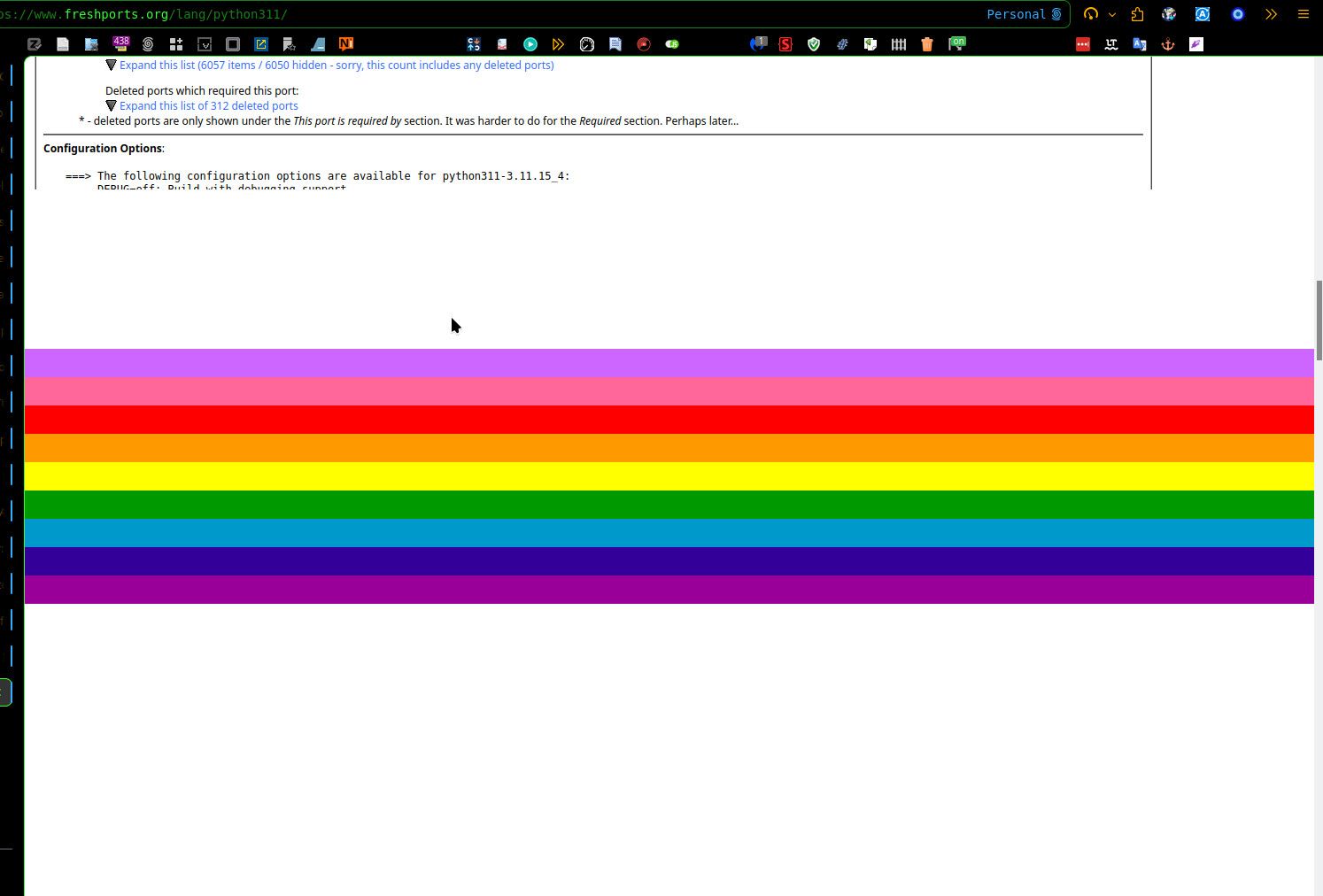
I use the template Solar on the billboard.
Into the Linux forum, a category tag is displayed, but actually, it's not possible to "understand" what it's wrote into this tag. The text within is “invisible”, unreadable!
See the screenshot:

Similarly, with the Yeti skin I get missing texts in the Powered by area: [image: 1776614005911-5ecfb87a-4915-4555-9d1e-fc1c79f680e1-image.jpeg] Also with Yeti, https://billboard.bsd.cafe/unread failed to show the name of at least one category, OpenBSD. I wonder whether the issue will be reproducible with the default (no skin). -
Hi.
A few minutes ago, I posted the following: https://billboard.bsd.cafe/topic/94/running-your-own-as
I've just noticed that it was posted on Mastodon, as instance: https://bsd.network/web/@ciotbsd@billboard.bsd.cafe/116425567925824807Is it normal for the HTML code to be displayed in the body of the message?
… my previous posts, they don’t seem to have had this problem. Here's another: [image: 1776611842047-9fa33bf5-3db8-440d-8319-ac4e051217ad-image.jpeg] When using glitch-soc at BSD Network to create and edit a post, it seems that Markdown and HTML options work only if the required content type is preselected when drafting and when editing. Examples: https://bsd.network/@grahamperrin/116432053054263857 https://bsd.network/@grahamperrin/116432064198716983 I assume that when an HTML post is incoming from something other than glitch-soc, glitch-soc defaults to plain text – without attempting to automatically detect HTML. glitch-soc/mastodon: A glitchy but lovable microblogging server issues … -
At work we are uing BSDs extensivly for almost all aspects, except as hardware crypto modules (HSMs). We are also using BSDs as workstations for the daily toil. This of course require a set of usage policies to formalise what is accepted and not.
I'm glad we managed to get NetBSD into the official company policy with the following condition
Must run on workstation/laptop hardware. Coffee brewers, toasters or other household appliances are explicitly forbidden from accessing production network.On a sader note, OpenBSD is no longer allowed access, when 7.7 goes out of official support in a few weeks time, due to the decision to remove yubikey-otp keyboard support in the kernel from 7.8.
Oh well
Cheers and RunBSD!
-
One of my biggest "frustrations" when migrating from OpenBSD to FreeBSD as my daily driver, was the loss of of working media keys on my Das Keyboard - especially the very convenient volume jog wheel.
After some poking around i confirmed that the usbhid driver was working - and also default enabled in FreeBSD15 kernel. Xev tool printed the correct keycode events
keycode 122 = XF86AudioLowerVolume keycode 123 = XF86AudioRaiseVolume keycode 172 = XF86AudioPlayThe problem narrowed down to how to map these event to something useful
I found a working solution in this discussion thread, by using the x11/sxhkd daemon to pass the events to mixer(8)
I had to tweak the sxhkd config a bit to work properly with mixer
~/.config/sxhkd/sxhkdrc
XF86Audio{Play,LowerVolume,RaiseVolume} mixer {vol.mute="toggle",vol="-3%", vol="+3%"}Then I invoke the sxhkd daemon from my ~/.xsession file
sxhkd & exec /usr/local/bin/fvwm3Viola!
#FreeBSD #Solved #X11 #FVWM3 #Xorg #AskFedi
-
Part1: Running Your Own AS: BGP on FreeBSD with FRR, GRE Tunnels, and Policy Routing:
- https://blog.hofstede.it/running-your-own-as-bgp-on-freebsd-with-frr-gre-tunnels-and-policy-routing/
Part2: Running Your Own AS: Going Multi-Homed with iBGP and three Transits:
Part3: Running Your Own AS: Joining an IXP with a Third Edge Router:
Part4: Running Your Own AS: Direct Hetzner Peering, a Fourth Edge, and Bringing the Home LAN into the Fabric:
-
You are a fan of one or more BSD os. Is that BSD (doesn't matter which one) your daily driver, your primary OS on your main computer?
A three-day poll by @darth@silversword.online:
-
To some the current shiny aqua-like orb logo may seem a little dated. I know it does for me. And it's probably a little hard to print and reproduce. We often see a newer logo, which I personally think is a huge improvement. Anyhow, I played around with the design this morning and wanted to share a refined version. Tell me what you think.

I have to say, i really like the glassy orb logo. i don't really think it needs changing. i think much the same WRT the website redesign. i like the skeumorphic layout. it reminds me of a time when the web was much more approachable without cleanup software like adblockers. i like the current freebsd website for the same reasons i like the OpenBSD website. -
See: https://www.ietf.org/archive/id/draft-thain-ipv8-00.html
Descr: Internet Protocol Version 8 (IPv8) is a managed network protocol suite that transforms how networks of every scale -- from home networks to the global internet -- are operated, secured, and monitored.
-
OpenBSD Frens...
What's the latest p00p on hw.smt ?
Been doing some looking around and am not able to suss out what the latest guidance is re: hw.smt and performance.
I get the point about security, just wondering if there are any performance "gotchas" with SMT in the kernel nowadays.
I've seen posts (old) talking about enabling smt in the OpenBSD kernel doesn't get great gains. Is this still current thinking/advice?
I remember when FreeBSD SMT was considered "not that performant" but that's not the case any more. Has OpenBSD followed suit?
Inquiring minds and all that...
-
I came across this post:
https://phanpy.social/#/hachyderm.io/s/115891592999188880
It describes a very common situation: large SQL dumps, vim becoming
unusable, and ed(1) suddenly making sense again.This is not accidental.
Screen editors are designed for interactive, cursor-based editing.
When files reach hundreds of megabytes or gigabytes, those assumptions break down.
Startup cost, redraw, navigation, and internal structures become the real bottleneck.At that point, using tools like grep, sed, awk, or ed is not a
workaround — it is the correct approach.Key idea:
Large files do not require faster editors; they require different tools.
As another data point in comparing how different editors work, here's an old one by the author of the very undervalued joe editor. In general, there's nothing preventing screen editors from working properly and fast here, it's just not something they optimized for. If they did it at all, internal editor data structures tend to be quite simple these days, as virtual memory works for most cases. People had to get a lot more tricky on smaller devices (or they gave up early, cf. Windows Notepad). Heretically, I'd also like to say that a lot of files that aren't binary and huge, different tools often wouldn't point at e.g. sed, as you're running into the old "Now they have two problems." issue then.