Skip to content
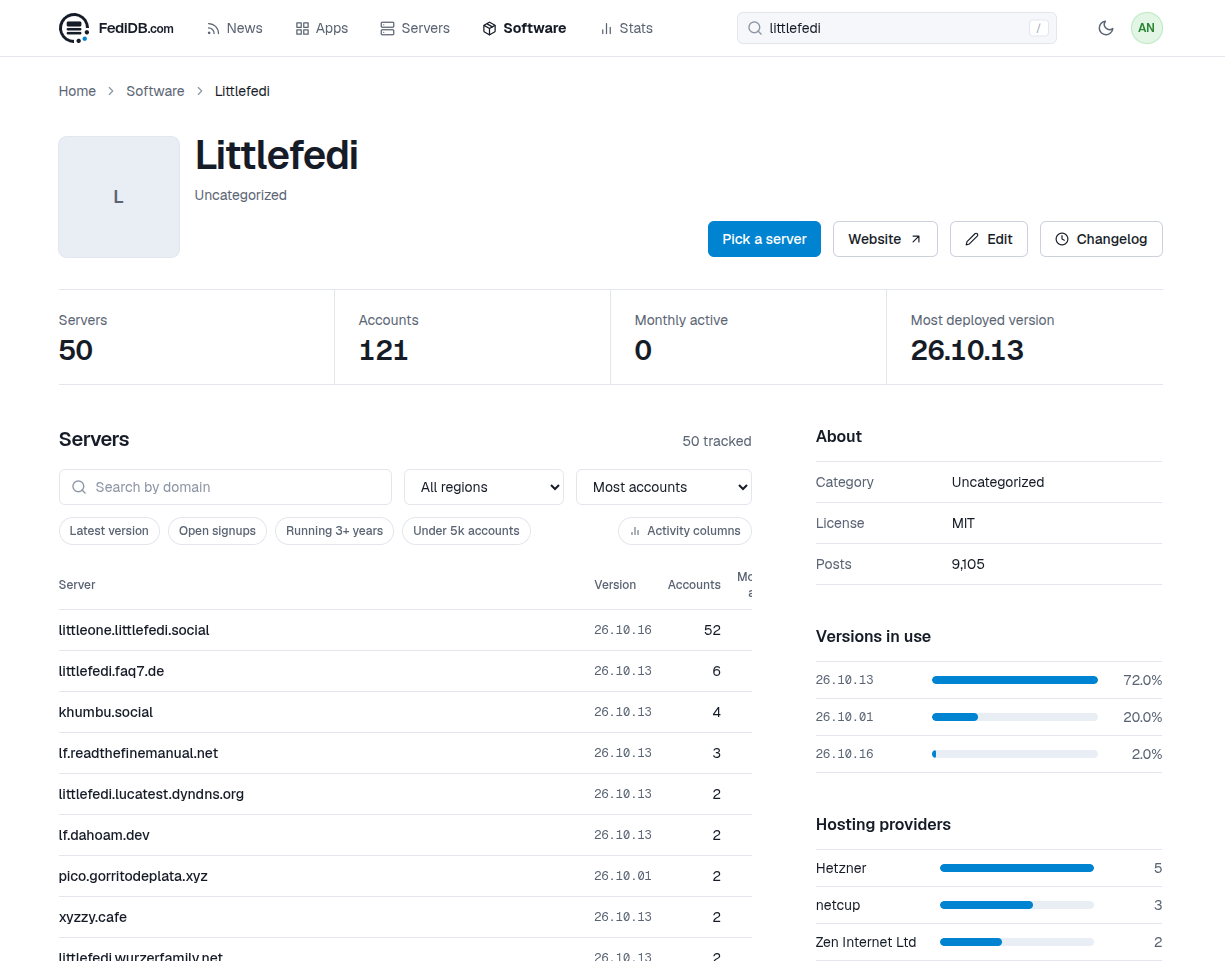
  • #LittleFedi is now known to FediDB

    World littlefedi
    2
    1
    0 Votes
    2 Posts
    0 Views
    stefano@mastodon.bsd.cafeS
    @andyc fun fact: it's not aware of my rpi0w instance, that is the first littleFedi instance that really federated
  • 0 Votes
    2 Posts
    0 Views
    stefano@mastodon.bsd.cafeS
    @lemond0x Good luck with your instance!Of course, you’re free to choose whatever name you like. However, I would have appreciated at least a heads-up about using a domain name that could quite easily lead people to believe it’s an official instance of the project.If possible, I’d ask you to make it clear somewhere that this is an independent instance and not the official littleFedi instance, so that people are aware of the distinction.
  • Okay, nice.

    World littlefedi openbsd [...snip
    1
    0 Votes
    1 Posts
    0 Views
    rqm@0xde501a7a.netR
    Okay, nice. Managed to lock down this #littlefedi instance a little bit more to prevent my accidentally "public" posts to be scraped via the web interface. In my littlefedi.toml: [web] redirect_guests_to_about = true And then in #OpenBSD relayd I have the following in addition to this: # /etc/relayd.conf # [...snip...] http protocol "http_to_https" { #[... snip...] # Littlefedi forwards block request quick path pattern "^/public/local" pass request quick header "Host" value "0xde501a7a.net" forward to <littlefedi> #[...snip...] } This should be solid enough
  • @stefano@bsd.cafe Hi Stefano!

    World littlefedi
    2
    0 Votes
    2 Posts
    0 Views
    stefano@mastodon.bsd.cafeS
    @bastian@scheefe.de @bastian@dev05.de @Bastianoso great! Enjoy your instance!
  • 0 Votes
    2 Posts
    0 Views
    stefano@mastodon.bsd.cafeS
    @justine I've just submitted the new port but yes, that will always be a little behind
  • 0 Votes
    1 Posts
    0 Views
    stefano@littleone.littlefedi.socialS
    Do you want to see a #littleFedi instance's directory? Here it is. It's all here. littleone@littleone:~/littleone $ ls -l total 2534224 drwx------ 5 littleone littleone 5 Oct 12 21:23 backups drwxr-xr-x 30 littleone littleone 30 Oct 13 16:22 blogs -rwxr-xr-x 1 root wheel 28676230 Oct 12 11:19 littlefedi-freebsd-amd64 -rw------- 1 littleone littleone 4367925248 Oct 13 19:56 littlefedi.db -rw------- 1 littleone littleone 98304 Oct 13 12:20 littlefedi.db-shm -rw------- 1 littleone littleone 108442552 Oct 13 19:56 littlefedi.db-wal -rw------- 1 littleone littleone 3645 Sep 30 19:48 littlefedi.toml drwxr-x--- 402 littleone littleone 402 Oct 13 16:43 media #littleOne
  • 0 Votes
    2 Posts
    0 Views
    stefano@mastodon.bsd.cafeS
    @42 Yes, exactly. I didn't specify it as...there's nothing to do except replacing the binary file.No DB migrations, this time. So nothing to worry about.
  • 0 Votes
    1 Posts
    0 Views
    littlefedi_official@littleone.littlefedi.socialL
    A new build of littleFedi (2026.10.13) is out! We've made several changes based on reports from our friends on this instance, feedback from those who have started self-hosting, and code reviews by the Little Computer People. Here's a non-exhaustive changelog: Alt text changed while editing a post from a Mastodon client (Mastodon web, Phanpy, Elk, Ivory, Tusky and others) was silently dropped. It is now saved and sent to other servers with the edit. Alt text of images already attached to a post can now be edited from the web composer. When a remote author adds or changes alt text by editing a post, the change now shows up here too. Before, the post kept its old description, and stayed hidden for anyone filtering out media without alt text. PUT /api/v1/media/:id can now clear a description, and refuses media that is already attached to a post, as Mastodon does. Use the status edit instead. Alt text is limited to 1500 characters on the server too, not only in the browser. Longer remote descriptions are cut at the same length. The limit is reported as description_limit in /api/v2/instance. Media without alt text now report description as null in the API, so clients no longer show an empty ALT badge. New Favourites page in the web interface, in the main menu, listing the posts you liked, most recent first. Paging through /api/v1/favourites skipped or repeated posts after the first page. It now continues from the last post shown, like bookmarks. When the timeline tabs or the top menu do not fit on one line, they now show only their icons. Before, some themes cut the last items off or split them over two rows. Keep the canonical instance actor URL public in secure and allowlist modes, fixing a key-fetch deadlock with other authorized-fetch servers. With split domains, /api/v1/instance now reports the handle domain as uri, and actors carry a webfinger property with their canonical handle. Hashtags can now be followed from the search in Settings > Followed hashtags, even before any post uses them. Hashtag pages with non-ASCII names, such as #caffè, now open and follow correctly. New [web] redirect_guests_to_about sends signed-out visitors from / to /about, and [web] public_blog_directory = false puts /blogs and its sitemap index behind the login. public_local_timeline = false now also hides the links to the local timeline and asks for login on /public/local and when scrolling, not only on /. Signed-out visitors could load the federated and bubble timelines through the scrolling endpoint. They now get the login page. Moved profiles now show the destination and replace Follow with a link to the new account. Old posts remain accessible, and cached account data is refreshed as soon as the move is saved. Move notifications now show and link to the destination, while the account name still opens the original profile. Moves by different users stay in separate notification rows when grouping is enabled. Cached timelines now pick up new posts when blog publishing is enabled, without waiting for the page cache to expire. Incoming boosts also update open timelines through streaming. Profile bios can now contain up to 5,000 characters in the web editor, up from 500. The notifications page now has a Mark all as read button. Clear all still deletes them. Follows imported from CSV are now saved before the upload is confirmed and resume after a restart. Settings and the API show progress, existing follows and failed lookups. Follow requests and their outgoing deliveries are saved together, and only one import can run per account. This uses the existing database schema. CSV files over migration.max_follows_import are now rejected instead of being silently truncated. Set the limit to 0 to import the whole file. CSV imports now leave an internal notification when they finish or stop after a terminal error, with a summary and a link to that import. Retries do not duplicate the notice; no email or push is sent. Multiple Mastodon API Fixes Replies in the web interface now keep the original post's content warning, both in the timeline and on the thread page. Media can be added to a post by dragging files onto the composer or by pasting an image, as well as with the file picker. Files dropped elsewhere on the page go to the main composer instead of replacing the page. Enjoy! #littleFedi #Fediverse
  • 0 Votes
    14 Posts
    0 Views
    stefano@mastodon.bsd.cafeS
    @andyc @chrism @justine Exactly. That's precisely why I pushed to release the software, and under the most permissive license possible.Right now, I'm a SPOF. But the Little Computer People could step forward at that point. Or at least one of them.But that's not important: the code is free, MIT-licensed, and it's there. If I were to open a physical BSD Cafe and disappear from the IT world (or disappear from the world altogether, although I have no plans to do that for at least another 100 years), the code would still be there, available to everyone.I know at least two people who would pick it up immediately, and I already know there are a few forks out there for studying the code and adapting it to specific situations.The moment the code became public, I relaxed.
  • 0 Votes
    1 Posts
    0 Views
    stefano@mastodon.bsd.cafeS
    RE: https://littleone.littlefedi.social/@lilpoes/01a12806-d388-7680-86a6-bbd3135c525aA simple and effective guide to use S3 for littleFedi media files#littleFedi
  • Dear #littleOne friends,

    World littlefedi littleone
    1
    0 Votes
    1 Posts
    0 Views
    stefano@littleone.littlefedi.socialS
    Dear #littleOne friends, A new build of littleFedi is now powering this instance! We've made several changes based on reports from our friends on this instance, feedback from those who have started self-hosting, and code reviews by the Little Computer People. There are still a few things to integrate, but this will probably be the next build we release (likely tomorrow or on the 14th, two weeks after the previous release). I'm attaching a non-exhaustive changelog: Alt text changed while editing a post from a Mastodon client (Mastodon web, Phanpy, Elk, Ivory, Tusky and others) was silently dropped. It is now saved and sent to other servers with the edit. Alt text of images already attached to a post can now be edited from the web composer. When a remote author adds or changes alt text by editing a post, the change now shows up here too. Before, the post kept its old description, and stayed hidden for anyone filtering out media without alt text. PUT /api/v1/media/:id can now clear a description, and refuses media that is already attached to a post, as Mastodon does. Use the status edit instead. Alt text is limited to 1500 characters on the server too, not only in the browser. Longer remote descriptions are cut at the same length. The limit is reported as description_limit in /api/v2/instance. Media without alt text now report description as null in the API, so clients no longer show an empty ALT badge. New Favourites page in the web interface, in the main menu, listing the posts you liked, most recent first. Paging through /api/v1/favourites skipped or repeated posts after the first page. It now continues from the last post shown, like bookmarks. When the timeline tabs or the top menu do not fit on one line, they now show only their icons. Before, some themes cut the last items off or split them over two rows. Keep the canonical instance actor URL public in secure and allowlist modes, fixing a key-fetch deadlock with other authorized-fetch servers. With split domains, /api/v1/instance now reports the handle domain as uri, and actors carry a webfinger property with their canonical handle. Hashtags can now be followed from the search in Settings > Followed hashtags, even before any post uses them. Hashtag pages with non-ASCII names, such as #caffè, now open and follow correctly. New [web] redirect_guests_to_about sends signed-out visitors from / to /about, and [web] public_blog_directory = false puts /blogs and its sitemap index behind the login. public_local_timeline = false now also hides the links to the local timeline and asks for login on /public/local and when scrolling, not only on /. Signed-out visitors could load the federated and bubble timelines through the scrolling endpoint. They now get the login page. Moved profiles now show the destination and replace Follow with a link to the new account. Old posts remain accessible, and cached account data is refreshed as soon as the move is saved. Move notifications now show and link to the destination, while the account name still opens the original profile. Moves by different users stay in separate notification rows when grouping is enabled. Cached timelines now pick up new posts when blog publishing is enabled, without waiting for the page cache to expire. Incoming boosts also update open timelines through streaming. Profile bios can now contain up to 5,000 characters in the web editor, up from 500. The notifications page now has a Mark all as read button. Clear all still deletes them. Follows imported from CSV are now saved before the upload is confirmed and resume after a restart. Settings and the API show progress, existing follows and failed lookups. Follow requests and their outgoing deliveries are saved together, and only one import can run per account. This uses the existing database schema. CSV files over migration.max_follows_import are now rejected instead of being silently truncated. Set the limit to 0 to import the whole file. CSV imports now leave an internal notification when they finish or stop after a terminal error, with a summary and a link to that import. Retries do not duplicate the notice; no email or push is sent. Multiple Mastodon API Fixes Replies in the web interface now keep the original post's content warning, both in the timeline and on the thread page. Media can be added to a post by dragging files onto the composer or by pasting an image, as well as with the file picker. Files dropped elsewhere on the page go to the main composer instead of replacing the page. #littleFedi
  • 0 Votes
    2 Posts
    0 Views
    stefano@mastodon.bsd.cafeS
    @justine make sure the two instances can talk each other. If they’re two jails in the same host, make sure to put in the /etc/hosts the correct resolution for the reverse proxy jail ip address. I’ve faced this many times with many other services: they try to communicate using the public ip addresses and they fail
  • 0 Votes
    2 Posts
    0 Views
    stefano@mastodon.bsd.cafeS
    @justine hello! Federations should all be following the same path, so that's absolutely strange. Unless you're using two different domains (web domain and handle, but it doesn't seem to be the case). I guess it might be some sort of reverse proxy issue? Can you please put it in debug mode and send me some logs when federating?
  • Not bad so far.

    World littlefedi
    1
    2
    0 Votes
    1 Posts
    0 Views
    xiaotuolu@r6xjcr4byvoci6cdmbon2u3vtqlxlfwsfd2dpae7zpqfql5quqmq.mesh.yrabbit.cyouX
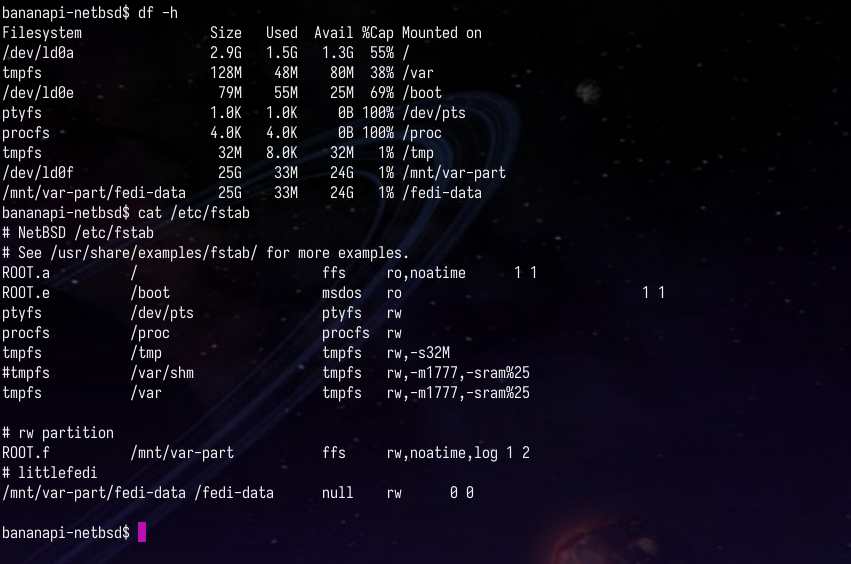
    Not bad so far. / read-only./var is in memory (seems like a bit too much free space there; need to see where to tweak it).#littleFedi is on its own partition. CPU load is modest.
  • #littlefedi + Garage S3

    World littlefedi
    1
    0 Votes
    1 Posts
    0 Views
    lilpoes@littleone.littlefedi.socialL
    #littlefedi + Garage S3 Create a bucket, because I will using custom domain for this bucket (different with endpoint domain name) so the bucket name is my custom domain name eg. img.domain.com, Enable "exposing website access" to img.domain.com bucket Garage: exposing websites, Configure a reverse proxy with Caddy or nginx to point the img.domain.com to Garage web access Garage: Reverse Proxy Edit the littlefedi.toml file [media] backend = "s3" public_base_url = "https://img.domain.com" # custom domain [media.s3] bucket = "img.domain.com" # bucket name endpoint = "s3.endpoint.com # real Garage S3 endpoint region = "us-east-1" access_key = "myraccesskey" secret_key = "mysecretkey" Save and start littlefedi PS: I need to download binary or build littlefedi source with S3 support.
  • Fantastic.

    World littlefedi
    11
    0 Votes
    11 Posts
    0 Views
    stefano@mastodon.bsd.cafeS
    @andyc @jack this is a wip
  • 0 Votes
    2 Posts
    0 Views
    stefano@mastodon.bsd.cafeS
    @chrism both here or via email (stefano@dragas.it) and I’ll forward to the devs
  • 0 Votes
    4 Posts
    0 Views
    stefano@mastodon.bsd.cafeS
    @Bastianoso @MonaApp @IceCubesApp @ivory @littlefedi_official the devs have been working on it and the missing endpoint has been implemented. It will be in the next build.
  • 0 Votes
    3 Posts
    0 Views
    stefano@mastodon.bsd.cafeS
    @andyc @chrism MastoBlaster works, too. For obvious reasons
  • 0 Votes
    2 Posts
    0 Views
    stefano@mastodon.bsd.cafeS
    @andyc @evan Thank you!PS: the pizza is coming...