
the work I did on perfecting desktop-installer on OpenBSD has been merged.
-
This additionally adds gnome and kde support too.
also there's a wip installer for the script for the time being while its not in the official openbsd ports collection.
I plan on re-submitting the ports to ports@ once the ports tree unlocks again.
https://github.com/outpaddling/desktop-installer/blob/master/OpenBSD/getting-started.md
-
 H horia@honk.vedetta.com shared this topic on
-
Great work! I've always manually set up OpenBSD (I remember
desktop-installerbut I don't think it supported what I wanted before). Will definitely try this on my Dell Inspiron I'm installing OpenBSD on this week
@naltun report your experience to this thread please when you do:
https://github.com/outpaddling/desktop-installer/issues/30thanks for the kind words!
-
Hi.
I've just to read only the "OpenBSD installer".
About Xfce, it seems me that it's missing this:
usermod -G _shutdown,wheel <username>_shutdownto shutdown or reboot sys, since 7.4wheelto manage/enable the sleep and hibernate functions
For Gnome, it's seems to needed to manage limits, like on
/etc/login.conf:gnome:\ :datasize-cur=1024M:\ :tc=default:and adding user to gnome:
usermod -L gnome <username>
(see the pkg_readme of gnome)
Enjoy-ID!
Enjoy-IT!> Per terminus, ad terminal
-
Hi.
I've just to read only the "OpenBSD installer".
About Xfce, it seems me that it's missing this:
usermod -G _shutdown,wheel <username>_shutdownto shutdown or reboot sys, since 7.4wheelto manage/enable the sleep and hibernate functions
For Gnome, it's seems to needed to manage limits, like on
/etc/login.conf:gnome:\ :datasize-cur=1024M:\ :tc=default:and adding user to gnome:
usermod -L gnome <username>
(see the pkg_readme of gnome)Hi.
I've just to read only the "OpenBSD installer".
About Xfce, it seems me that it's missing this:
usermod -G _shutdown,wheel <username>_shutdownto shutdown or reboot sys, since 7.4wheelto manage/enable the sleep and hibernate functions
We use consolekit for this on supported desktops, including xfce, like the pkg-readme says to. This change isn't needed. Also by default the regular user made in the installer of the OpenBSD system is in :wheel by default.
For Gnome, it's seems to needed to manage limits, like on
/etc/login.conf:gnome:\ :datasize-cur=1024M:\ :tc=default:and adding user to gnome:
usermod -L gnome <username>
(see the pkg_readme of gnome)I see no mention of login class settings for gnome in the pkg-readme.
Also don't set this. This is lower than the default class, and will likely break things:
default:\ :path=/usr/bin /bin /usr/sbin /sbin /usr/X11R6/bin /usr/local/bin /usr/local/sbin:\ :umask=022:\ :datasize-max=1536M:\ :datasize-cur=1536M:\ :maxproc-max=256:\ :maxproc-cur=128:\ :openfiles-max=1024:\ :openfiles-cur=512:\ :stacksize-cur=4M:\ :localcipher=blowfish,a:\ :tc=auth-defaults:\ :tc=auth-ftp-defaults: -
@naltun report your experience to this thread please when you do:
https://github.com/outpaddling/desktop-installer/issues/30thanks for the kind words!
@naltun report your experience to this thread please when you do:
https://github.com/outpaddling/desktop-installer/issues/30thanks for the kind words!
et voila
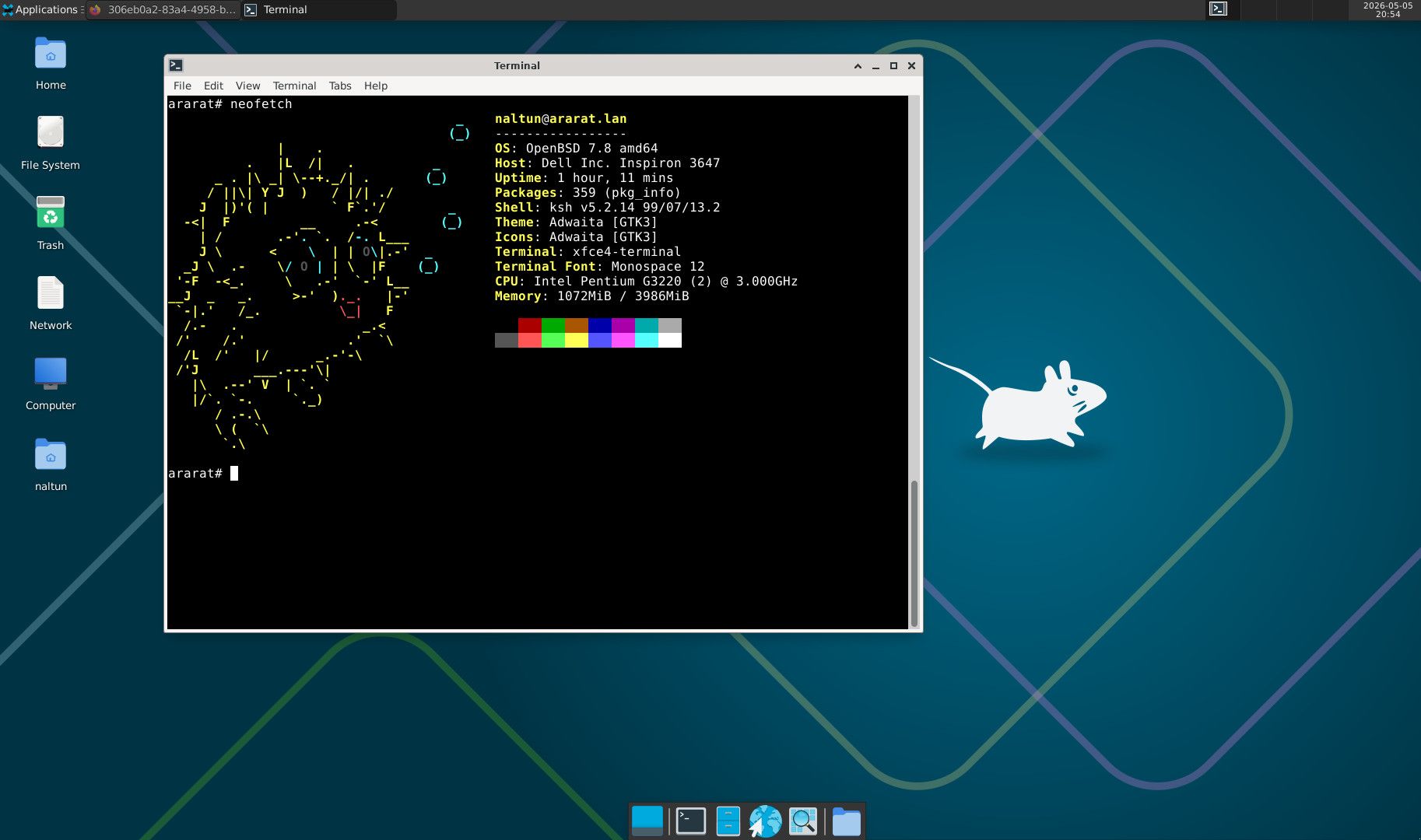
Thanks for the work on
desktop-installer@izder456 I'll update the PR with my experience when I get a chancee: retake screenshot
e: I added a comment in the PR thread

-
@izder456 and what about the lumina desktop? why the script does not manage it?!
(too many confidential?) -
This night, I tested Lumina on a fresh OpenBSD (qemu).
I was surprised to realize that there was no default terminal; you have to install one – unlike with Xfce or Mate.Similarly, I was unable to get the system to display messages in French; it simply wouldn’t work, even though the LC_MESSAGES environment variable had been set in my personal .profile file, or even via the available settings; when I restarted the session, it was still in American English!

After, I install Xfce; this DE recognize immediatly my personals parameters.
"Hi haaaa!"Bye Lumina! Anyway, I’ve always been a fan/lover of Xfce.

PS: This post is not a request for help; just a little story.
Enjoy-ID!
Enjoy-IT!> Per terminus, ad terminal
-
This night, I tested Lumina on a fresh OpenBSD (qemu).
I was surprised to realize that there was no default terminal; you have to install one – unlike with Xfce or Mate.Similarly, I was unable to get the system to display messages in French; it simply wouldn’t work, even though the LC_MESSAGES environment variable had been set in my personal .profile file, or even via the available settings; when I restarted the session, it was still in American English!
After, I install Xfce; this DE recognize immediatly my personals parameters.
"Hi haaaa!"Bye Lumina! Anyway, I’ve always been a fan/lover of Xfce.
PS: This post is not a request for help; just a little story.
… surprised to realize that there was no default terminal; you have to install one …
On FreeBSD, x11/plasma6-plasma-desktop is comparable. The Plasma desktop environment installs without Konsole, without System Settings, and so on:
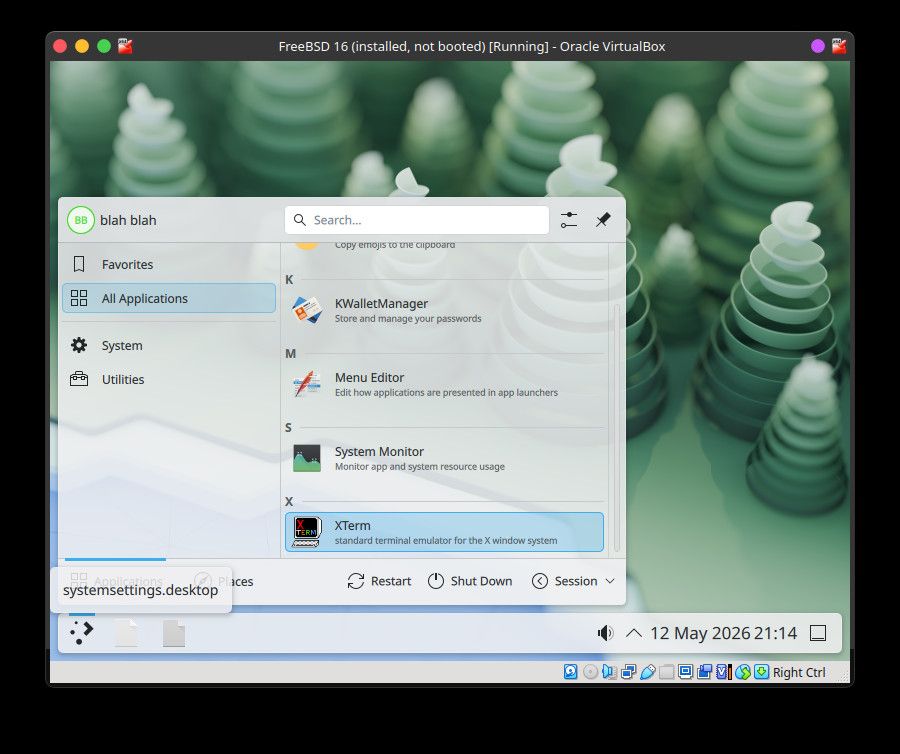
-
@izder456
Your quote in your tagline as a haiku:I say mundane things
so the uninteresting
just might get noticed. -
This night, I tested Lumina on a fresh OpenBSD (qemu).
I was surprised to realize that there was no default terminal; you have to install one – unlike with Xfce or Mate.Similarly, I was unable to get the system to display messages in French; it simply wouldn’t work, even though the LC_MESSAGES environment variable had been set in my personal .profile file, or even via the available settings; when I restarted the session, it was still in American English!
After, I install Xfce; this DE recognize immediatly my personals parameters.
"Hi haaaa!"Bye Lumina! Anyway, I’ve always been a fan/lover of Xfce.
PS: This post is not a request for help; just a little story.
This night, I tested Lumina on a fresh OpenBSD (qemu).
I was surprised to realize that there was no default terminal; you have to install one – unlike with Xfce or Mate.Similarly, I was unable to get the system to display messages in French; it simply wouldn’t work, even though the LC_MESSAGES environment variable had been set in my personal .profile file, or even via the available settings; when I restarted the session, it was still in American English!
After, I install Xfce; this DE recognize immediatly my personals parameters.
"Hi haaaa!"Bye Lumina! Anyway, I’ve always been a fan/lover of Xfce.
PS: This post is not a request for help; just a little story.
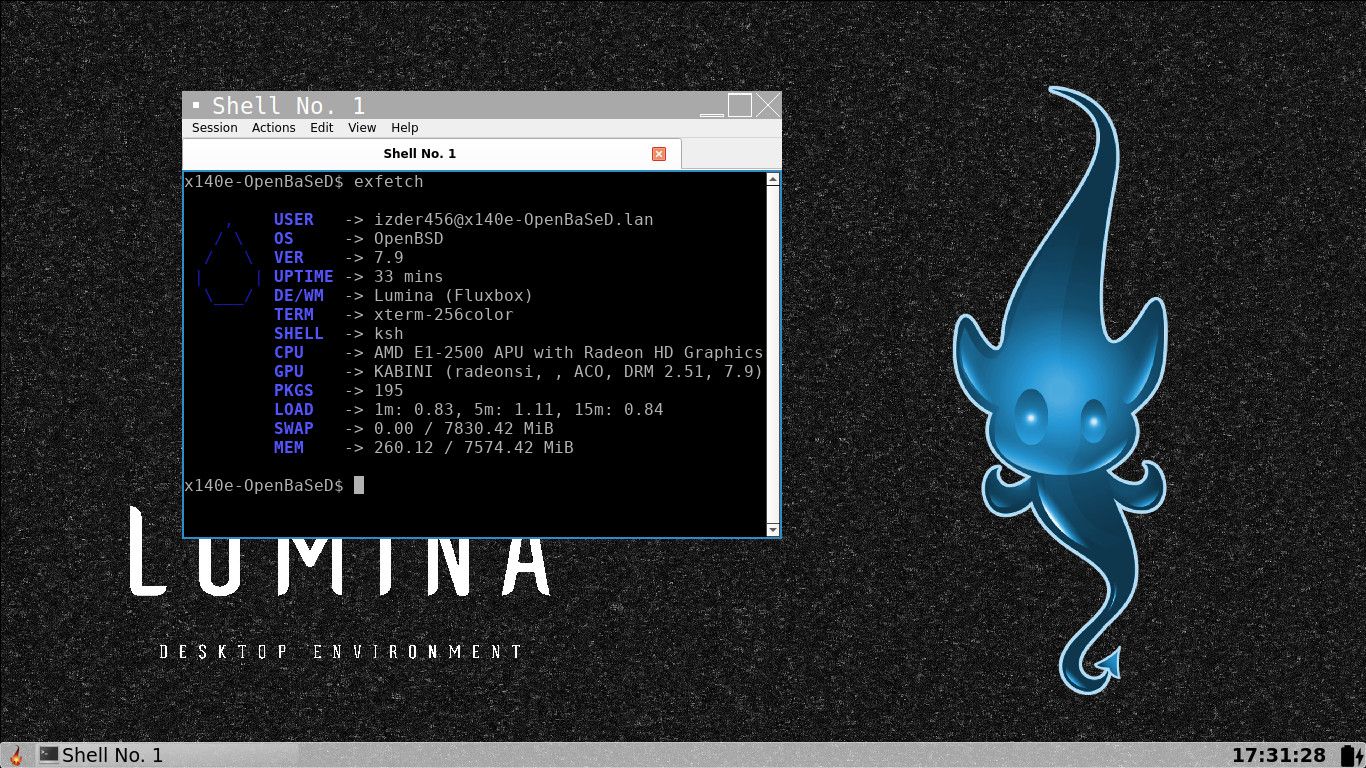
I just opened a PR in the github repository adding Lumina now that this script is more modular.
https://github.com/outpaddling/desktop-installer/pull/66
I also made it install qterminal as the default terminal.
It seems the lumina port on OpenBSD is out of date, (1.4.x vs 1.6.x), so maybe your locale issues are solved in a newer version.

feel free to test this, I'll update the OpenBSD-wip port shortly after a merge of this PR.
iz (she/her)
> I say mundane things
> so the uninteresting
> just might get noticed.izder456 (dot) neocities (dot) org
-
This night, I tested Lumina on a fresh OpenBSD (qemu).
I was surprised to realize that there was no default terminal; you have to install one – unlike with Xfce or Mate.Similarly, I was unable to get the system to display messages in French; it simply wouldn’t work, even though the LC_MESSAGES environment variable had been set in my personal .profile file, or even via the available settings; when I restarted the session, it was still in American English!
After, I install Xfce; this DE recognize immediatly my personals parameters.
"Hi haaaa!"Bye Lumina! Anyway, I’ve always been a fan/lover of Xfce.
PS: This post is not a request for help; just a little story.
I just opened a PR in the github repository adding Lumina now that this script is more modular.
https://github.com/outpaddling/desktop-installer/pull/66
I also made it install qterminal as the default terminal.
It seems the lumina port on OpenBSD is out of date, (1.4.x vs 1.6.x), so maybe your locale issues are solved in a newer version.
feel free to test this, I'll update the OpenBSD-wip port shortly after a merge of this PR.
izder456 said:
This night, I tested Lumina on a fresh OpenBSD (qemu).
I was surprised to realize that there was no default terminal; you have to install one – unlike with Xfce or Mate.Similarly, I was unable to get the system to display messages in French; it simply wouldn’t work, even though the LC_MESSAGES environment variable had been set in my personal .profile file, or even via the available settings; when I restarted the session, it was still in American English!
After, I install Xfce; this DE recognize immediatly my personals parameters.
"Hi haaaa!"Bye Lumina! Anyway, I’ve always been a fan/lover of Xfce.
PS: This post is not a request for help; just a little story.
I just opened a PR in the github repository adding Lumina now that this script is more modular.
https://github.com/outpaddling/desktop-installer/pull/66
I also made it install qterminal as the default terminal.
It seems the lumina port on OpenBSD is out of date, (1.4.x vs 1.6.x), so maybe your locale issues are solved in a newer version.
feel free to test this, I'll update the OpenBSD-wip port shortly after a merge of this PR.
It has been merged. Feel free to test the new ports in OpenBSD-wip now. Also feel free to report your experience to the GitHub thread.
CC @CiotBSD




Hello! It looks like you're interested in this conversation, but you don't have an account yet.
Getting fed up of having to scroll through the same posts each visit? When you register for an account, you'll always come back to exactly where you were before, and choose to be notified of new replies (either via email, or push notification). You'll also be able to save bookmarks and upvote posts to show your appreciation to other community members.
With your input, this post could be even better 💗
Register Login