
RedBSD with RTFMv2
-
… a FreeBSD-based distribution loaded with a curated red team and penetration testing toolkit, an XFCE-derived desktop, and VMware-ready images — built for operators who want a fast, stable alternative to Linux-based distros. …
https://greyprotocolsecurity.com/
RTFMv2 is the offensive security operations platform that combines structured checklists, automated scan integrations, and AI-assisted reporting—everything you need to finish assessments faster and with zero gaps.
This is neither an advertisement nor an endorsement.
I used RedBSD-1.20260713-amd64-installer.iso with Oracle VirtualBox 7.2.14 r174565 on Kubuntu 26.04:
- allowed the default set of RedBSD packages
shutdown -r now- installed emulators/virtualbox-ose-additions-72 and enabled its two services
- edited
/boot/loader.confand/etc/rc.confto make SDDM and the desktop environment work with VirtualBox instead of VMware - enabled and started the two services for VirtualBox
service sddm restart
Security notes
RedBSD's provisioning scripts make choices that are convenient for an isolated lab but are not safe on an untrusted or internet-facing network:
…
Additional background
Six Reddit posts:
- Red Team Oriented BSD OS : r/BSD (2026-06-15)
- Red BSD scam or real? : r/BSD (2026-06-16)
- RedBSD : r/freebsd (2026-07-10)
- RedBSD: Um FreeBSD para cyberseguranca : r/FreeBSD_BR (2026-07-10)
- RedBSD seems like only FreeBSD 15.1 : r/freebsd (2026-07-23)
- RedBSD continued. First Run. : r/freebsd (2026-07-24)
-
Note
Without the changes to
/boot/loader.confand/etc/rc.conf:- SDDM failed to start
- the virtual display was too large for my screens.
SDDM fails to start after installation in VirtualBox · Issue #5 · shanefarris/RedBSD
General information
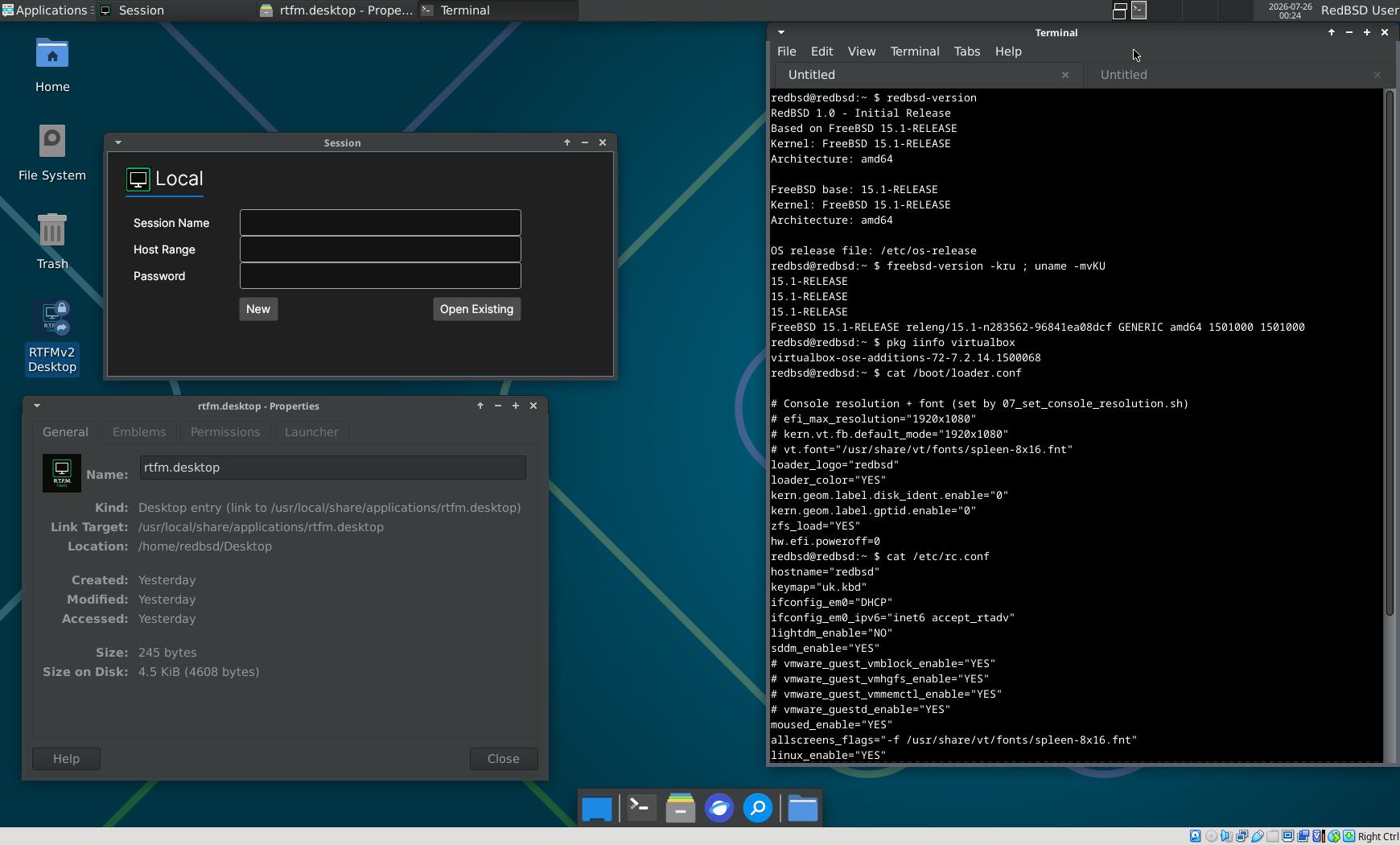
redbsd@redbsd:~ $ redbsd-version
RedBSD 1.0 - Initial Release
Based on FreeBSD 15.1-RELEASE
Kernel: FreeBSD 15.1-RELEASE
Architecture: amd64

FreeBSD base: 15.1-RELEASE
Kernel: FreeBSD 15.1-RELEASE
Architecture: amd64

OS release file: /etc/os-release
redbsd@redbsd:~ $ freebsd-version -kru ; uname -mvKU
15.1-RELEASE
15.1-RELEASE
15.1-RELEASE
FreeBSD 15.1-RELEASE releng/15.1-n283562-96841ea08dcf GENERIC amd64 1501000 1501000
redbsd@redbsd:~ $ pkg iinfo virtualbox
virtualbox-ose-additions-72-7.2.14.1500068
redbsd@redbsd:~ $
/boot/loader.conf
redbsd@redbsd:~ $ cat /boot/loader.conf

# Console resolution + font (set by 07_set_console_resolution.sh)
# efi_max_resolution="1920x1080"
# kern.vt.fb.default_mode="1920x1080"
# vt.font="/usr/share/vt/fonts/spleen-8x16.fnt"
loader_logo="redbsd"
loader_color="YES"
kern.geom.label.disk_ident.enable="0"
kern.geom.label.gptid.enable="0"
zfs_load="YES"
hw.efi.poweroff=0
redbsd@redbsd:~ $
/etc/rc.conf
redbsd@redbsd:~ $ cat /etc/rc.conf
hostname="redbsd"
keymap="uk.kbd"
ifconfig_em0="DHCP"
ifconfig_em0_ipv6="inet6 accept_rtadv"
lightdm_enable="NO"
sddm_enable="YES"
# vmware_guest_vmblock_enable="YES"
# vmware_guest_vmhgfs_enable="YES"
# vmware_guest_vmmemctl_enable="YES"
# vmware_guestd_enable="YES"
moused_enable="YES"
allscreens_flags="-f /usr/share/vt/fonts/spleen-8x16.fnt"
linux_enable="YES"
# vmware_guest_vmxnet_enable="YES"
wlans_iwm0="wlan0"
sshd_enable="YES"
ntpd_enable="YES"
ntpd_sync_on_start="YES"
moused_nondefault_enable="NO"
# Set dumpdev to "AUTO" to enable crash dumps, "NO" to disable
dumpdev="AUTO"
zfs_enable="YES"
vboxguest_enable="YES"
vboxservice_enable="YES"
redbsd@redbsd:~ $
Bonus
This line in
/boot/loader.confis for FreeBSD to truly power off, when required, in a VirtualBox guest that uses UEFI:hw.efi.poweroff=0Not just VirtualBox. It's sometimes required with real hardware.
-
redbsd@redbsd:~ $ pkg leaf
7-zip-26.02
ImageMagick7-7.1.2.25_1
aircrack-ng-1.5.2_4
apache-ant-1.10.15_2
apache24-2.4.68
automake-1.18.1
bind-tools-9.20.24_1
ca_root_nss-3.125
cherrytree-1.7.0
cmake-3.31.12
crunch-3.6_1
doas-6.4
dotnet-9.0.14
dotnet8-8.0.27
engrampa-1.28.2_1
firefox-esr-153.0,2
freerdp3-3.30.0
gcc-14_5
gdb-15.1_5
geany-2.1
git-2.54.0
go-1.25_20,2
gradle-9.6.1
hashcat-7.1.2_11,1
hs-pandoc-3.10
htop-3.5.1
john-1.9.0.j.1_1
kismet-2016.07.r1_2,1
kubectl-1.36.1_2
libtool-2.5.4_1
lighttpd-1.4.84_1
linux-rl9-libxkbcommon-1.0.3_2
linux-rl9-xcb-util-0.4.0_2
llvm-19_1,1
lsof-4.99.5,8
mariadb1011-client-10.11.18
maven-3.8.9_3
mercurial-7.1.2
nano-9.0
nginx-1.30.4,3
ninja-1.13.2,4
nmap-7.99_1
node-24.18.0_3
noto-basic-2.0_4
npm-11.18.0
open-vm-tools-13.1.0,2
openjdk17-17.0.18+8.1
openjdk21-21.0.10+7.1_1
openssl-3.0.21,1
papirus-icon-theme-20250501
pavucontrol-6.1
php83-curl-8.3.32_1
php83-mbstring-8.3.32_1
php83-mysqli-8.3.32_1
php83-pdo_sqlite-8.3.32_1
php83-zip-8.3.32_1
pixiewps-1.4.1
podman-5.8.4_1
postgresql16-client-16.14
proxychains-ng-4.17
py312-certbot-4.2.0,1
py312-podman-compose-1.5.0
py312-pwntools-4.15.0_1
py312-virtualenv-21.2.3
python3-3_4
radare2-6.1.4
reaver-1.6.6_1
redis-8.8.0
ripgrep-15.1.0_6
ristretto-0.14.0
rizin-0.9.1
rsync-3.4.4_1
ruby-3.4.9_2,1
rust-1.96.1
screen-5.0.1_6
sddm-0.21.0.36_3
socat-1.8.1.3
sqlitebrowser-3.13.1
subversion-1.14.5_1
sudo-1.9.17p2_2
tcpdump-4.99.6
thunar-archive-plugin-0.6.0
tmux-3.7b
tree-2.3.2
trivy-0.72.0_1
vim-9.2.0738
virtualbox-ose-additions-72-7.2.14.1500068
vscode-1.127.0_1
wget-1.25.0
whois-5.5.7_1
xf86-video-vmware-13.4.0
xfce-4.20_2
xfce4-screenshooter-plugin-1.11.3
xmlstarlet-1.6.1_5
xorg-7.7_3
yq-4.1.1
zig-0.16.0
zip-3.0_5
zsh-5.9.1
redbsd@redbsd:~ $
Hello! It looks like you're interested in this conversation, but you don't have an account yet.
Getting fed up of having to scroll through the same posts each visit? When you register for an account, you'll always come back to exactly where you were before, and choose to be notified of new replies (either via email, or push notification). You'll also be able to save bookmarks and upvote posts to show your appreciation to other community members.
With your input, this post could be even better 💗
Register Login